
We are able to make a phone call in android via intent. You need to write only three lines of code to make a phone call.
Intent callIntent = new Intent(Intent.ACTION_CALL);
callIntent.setData(Uri.parse("tel:"+8802177690));//change the number
startActivity(callIntent);
Example of phone call in android
activity_main.xml
Drag the EditText and Button from the pallete, now the activity_main.xml file will like this:
File: activity_main.xml
Write the permission code in Android-Manifest.xml file
You need to write CALL_PHONE permission as given below:
File: Android-Manifest.xml
Activity class
Let’s write the code to make the phone call via intent.
File: MainActivity.java
package com.example.phonecall;

import android.net.Uri;
import android.os.Bundle;
import android.app.Activity;
import android.content.Intent;
import android.view.Menu;
import android.view.View;
import android.view.View.OnClickListener;
import android.widget.Button;
import android.widget.EditText;

public class MainActivity extends Activity {
    EditText edittext1;
    Button button1;
    @Override
    protected void onCreate(Bundle savedInstanceState) {
        super.onCreate(savedInstanceState);
        setContentView(R.layout.activity_main);

        //Getting the edittext and button instance
        edittext1=(EditText)findViewById(R.id.editText1);
        button1=(Button)findViewById(R.id.button1);

        //Performing action on button click
        button1.setOnClickListener(new OnClickListener(){

            @Override
            public void onClick(View arg0) {
                String number=edittext1.getText().toString();
                Intent callIntent = new Intent(Intent.ACTION_CALL);
                callIntent.setData(Uri.parse("tel:"+number));
                startActivity(callIntent);
            }

        });
    }

    @Override
    public boolean onCreateOptionsMenu(Menu menu) {
        // Inflate the menu; this adds items to the action bar if it is present.
        getMenuInflater().inflate(R.menu.activity_main, menu);
        return true;
    }

}
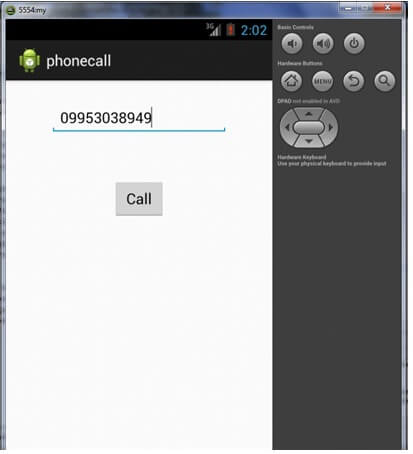
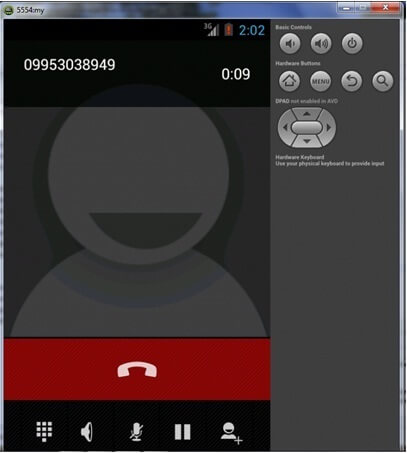
Output:


Leave A Comment