

JMS (Java Message Service) is an API that provides the facility to create, send and read messages. It provides loosely coupled, reliable and asynchronous communication.
JMS is also known as a messaging service.
Understanding Messaging
Messaging is a technique to communicate applications or software components.
JMS is mainly used to send and receive message from one application to another.
Requirement of JMS
Generally, user sends message to application. But, if we want to send message from one application to another, we need to use JMS API.
Consider a scenario, one application A is running in INDIA and another application B is running in USA. To send message from A application to B, we need to use JMS.
Advantage of JMS
1) Asynchronous: To receive the message, client is not required to send request. Message will arrive automatically to the client.
2) Reliable: It provides assurance that message is delivered.
Messaging Domains
There are two types of messaging domains in JMS.
- Point-to-Point Messaging Domain
- Publisher/Subscriber Messaging Domain
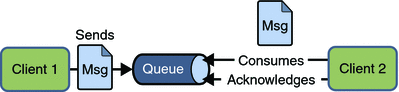
1) Point-to-Point (PTP) Messaging Domain
In PTP model, one message is delivered to one receiver only. Here, Queue is used as a message oriented middleware (MOM).
The Queue is responsible to hold the message until receiver is ready.
In PTP model, there is no timing dependency between sender and receiver.
2) Publisher/Subscriber (Pub/Sub) Messaging Domain
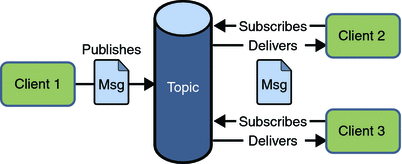
In Pub/Sub model, one message is delivered to all the subscribers. It is like broadcasting. Here, Topic is used as a message oriented middleware that is responsible to hold and deliver messages.
In PTP model, there is timing dependency between publisher and subscriber.
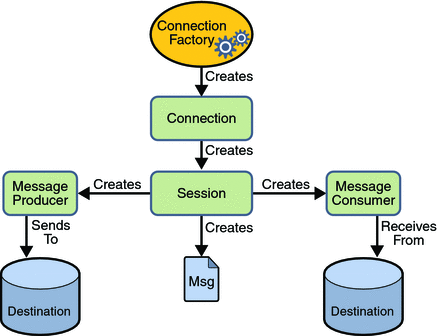
JMS Programming Model
JMS Queue Example
To develop JMS queue example, you need to install any application server. Here, we are using glassfish3 server where we are creating two JNDI.
- Create connection factory named myQueueConnectionFactory
- Create destination resource named myQueue
After creating JNDI, create server and receiver application. You need to run server and receiver in different console. Here, we are using eclipse IDE, it is opened in different console by default.
1) Create connection factory and destination resource
Open server admin console by the URL http://localhost:4848
Login with the username and password.
Click on the JMS Resource -> Connection Factories -> New, now write the pool name and select the Resource Type as QueueConnectionFactory then click on ok button.
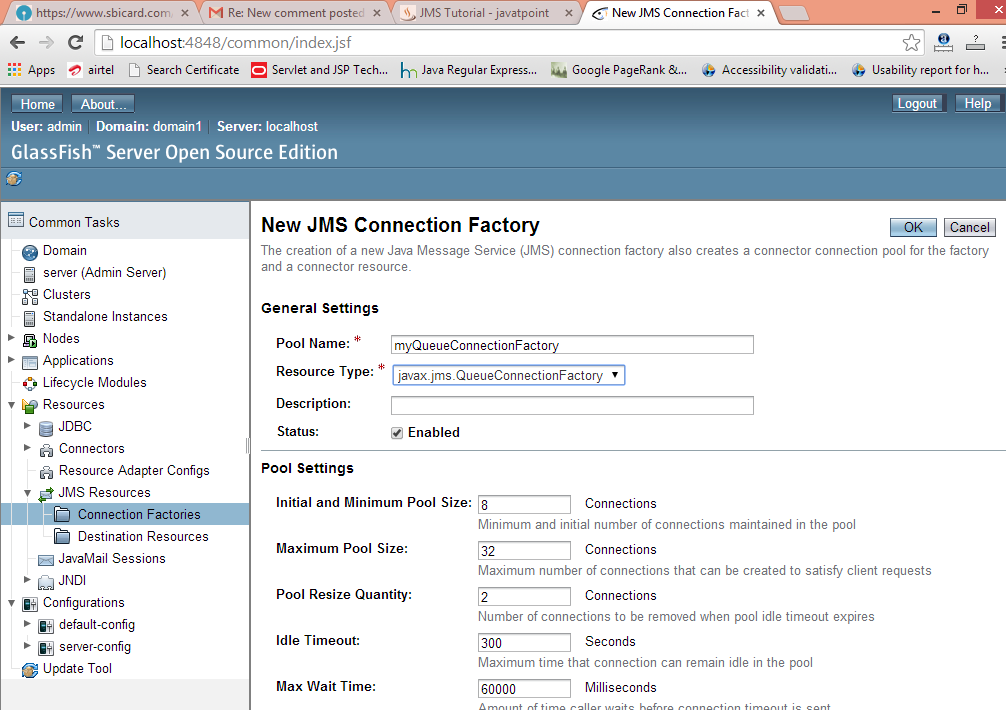
Click on the JMS Resource -> Destination Resources -> New, now write the JNDI name and physical destination name then click on ok button.
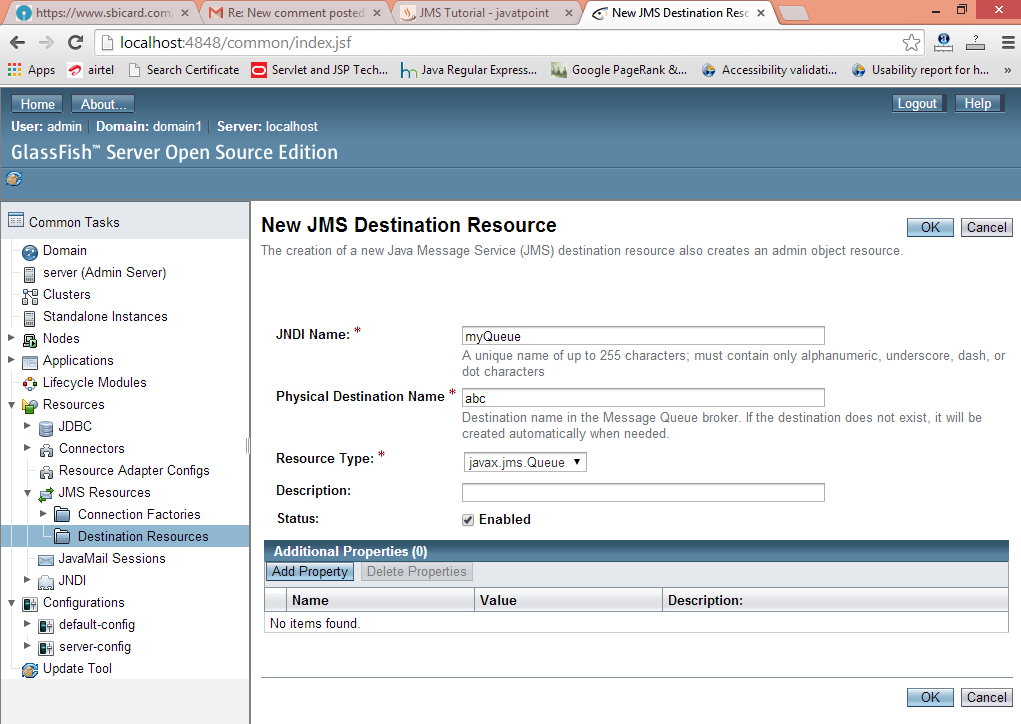
2) Create sender and receiver application
Let’s see the Sender and Receiver code. Note that Receiver is attached with listener which will be invoked when user sends message.
File: MySender.java
import java.io.BufferedReader;
import java.io.InputStreamReader;
import javax.naming.*;
import javax.jms.*;

public class MySender {
    public static void main(String[] args) {
        try
        {   //Create and start connection
            InitialContext ctx=new InitialContext();
            QueueConnectionFactory f=(QueueConnectionFactory)ctx.lookup("myQueueConnectionFactory");
            QueueConnection con=f.createQueueConnection();
            con.start();
            //2) create queue session
            QueueSession ses=con.createQueueSession(false, Session.AUTO_ACKNOWLEDGE);
            //3) get the Queue object
            Queue t=(Queue)ctx.lookup("myQueue");
            //4)create QueueSender object
            QueueSender sender=ses.createSender(t);
            //5) create TextMessage object
            TextMessage msg=ses.createTextMessage();

            //6) write message
            BufferedReader b=new BufferedReader(new InputStreamReader(System.in));
            while(true)
            {
                System.out.println("Enter Msg, end to terminate:");
                String s=b.readLine();
                if (s.equals("end"))
                    break;
                msg.setText(s);
                //7) send message
                sender.send(msg);
                System.out.println("Message successfully sent.");
            }
            //8) connection close
            con.close();
        }catch(Exception e){System.out.println(e);}
    }
}
File: MyReceiver.java
import javax.jms.*;
import javax.naming.InitialContext;

public class MyReceiver {
    public static void main(String[] args) {
        try{
            //1) Create and start connection
            InitialContext ctx=new InitialContext();
            QueueConnectionFactory f=(QueueConnectionFactory)ctx.lookup("myQueueConnectionFactory");
            QueueConnection con=f.createQueueConnection();
            con.start();
            //2) create Queue session
            QueueSession ses=con.createQueueSession(false, Session.AUTO_ACKNOWLEDGE);
            //3) get the Queue object
            Queue t=(Queue)ctx.lookup("myQueue");
            //4)create QueueReceiver
            QueueReceiver receiver=ses.createReceiver(t);

            //5) create listener object
            MyListener listener=new MyListener();

            //6) register the listener object with receiver
            receiver.setMessageListener(listener);

            System.out.println("Receiver1 is ready, waiting for messages...");
            System.out.println("press Ctrl+c to shutdown...");
            while(true){
                Thread.sleep(1000);
            }
        }catch(Exception e){System.out.println(e);}
    }

}
File: MyListener.java
import javax.jms.*;
public class MyListener implements MessageListener {

    public void onMessage(Message m) {
        try{
        TextMessage msg=(TextMessage)m;

        System.out.println("following message is received:"+msg.getText());
        }catch(JMSException e){System.out.println(e);}
    }
}
Run the Receiver class first then Sender class.
JMS Topic Example
It is same as JMS Queue, but you need to change Queue to Topic, Sender to Publisher and Receiver to Subscriber.
You need to create 2 JNDI named myTopicConnectionFactory and myTopic.
File: MySender.java
import java.io.BufferedReader;
import java.io.InputStreamReader;
import javax.naming.*;
import javax.jms.*;

public class MySender {
    public static void main(String[] args) {
        try
        {   //Create and start connection
            InitialContext ctx=new InitialContext();
            TopicConnectionFactory f=(TopicConnectionFactory)ctx.lookup("myTopicConnectionFactory");
            TopicConnection con=f.createTopicConnection();
            con.start();
            //2) create queue session
            TopicSession ses=con.createTopicSession(false, Session.AUTO_ACKNOWLEDGE);
            //3) get the Topic object
            Topic t=(Topic)ctx.lookup("myTopic");
            //4)create TopicPublisher object
            TopicPublisher publisher=ses.createPublisher(t);
            //5) create TextMessage object
            TextMessage msg=ses.createTextMessage();

            //6) write message
            BufferedReader b=new BufferedReader(new InputStreamReader(System.in));
            while(true)
            {
                System.out.println("Enter Msg, end to terminate:");
                String s=b.readLine();
                if (s.equals("end"))
                    break;
                msg.setText(s);
                //7) send message
                publisher.publish(msg);
                System.out.println("Message successfully sent.");
            }
            //8) connection close
            con.close();
        }catch(Exception e){System.out.println(e);}
    }
}
File: MyReceiver.java
import javax.jms.*;
import javax.naming.InitialContext;

public class MyReceiver {
    public static void main(String[] args) {
        try {
            //1) Create and start connection
            InitialContext ctx=new InitialContext();
            TopicConnectionFactory f=(TopicConnectionFactory)ctx.lookup("myTopicConnectionFactory");
            TopicConnection con=f.createTopicConnection();
            con.start();
            //2) create topic session
            TopicSession ses=con.createTopicSession(false, Session.AUTO_ACKNOWLEDGE);
            //3) get the Topic object
            Topic t=(Topic)ctx.lookup("myTopic");
            //4)create TopicSubscriber
            TopicSubscriber receiver=ses.createSubscriber(t);

            //5) create listener object
            MyListener listener=new MyListener();

            //6) register the listener object with subscriber
            receiver.setMessageListener(listener);

            System.out.println("Subscriber1 is ready, waiting for messages...");
            System.out.println("press Ctrl+c to shutdown...");
            while(true){
                Thread.sleep(1000);
            }
        }catch(Exception e){System.out.println(e);}
    }

}
File: MyListener.java
import javax.jms.*;
public class MyListener implements MessageListener {

    public void onMessage(Message m) {
        try{
        TextMessage msg=(TextMessage)m;

        System.out.println("following message is received:"+msg.getText());
        }catch(JMSException e){System.out.println(e);}
    }
}


Leave A Comment